For companies
Results and export
Live results, text answers, CSV and the poll archive.
Steps
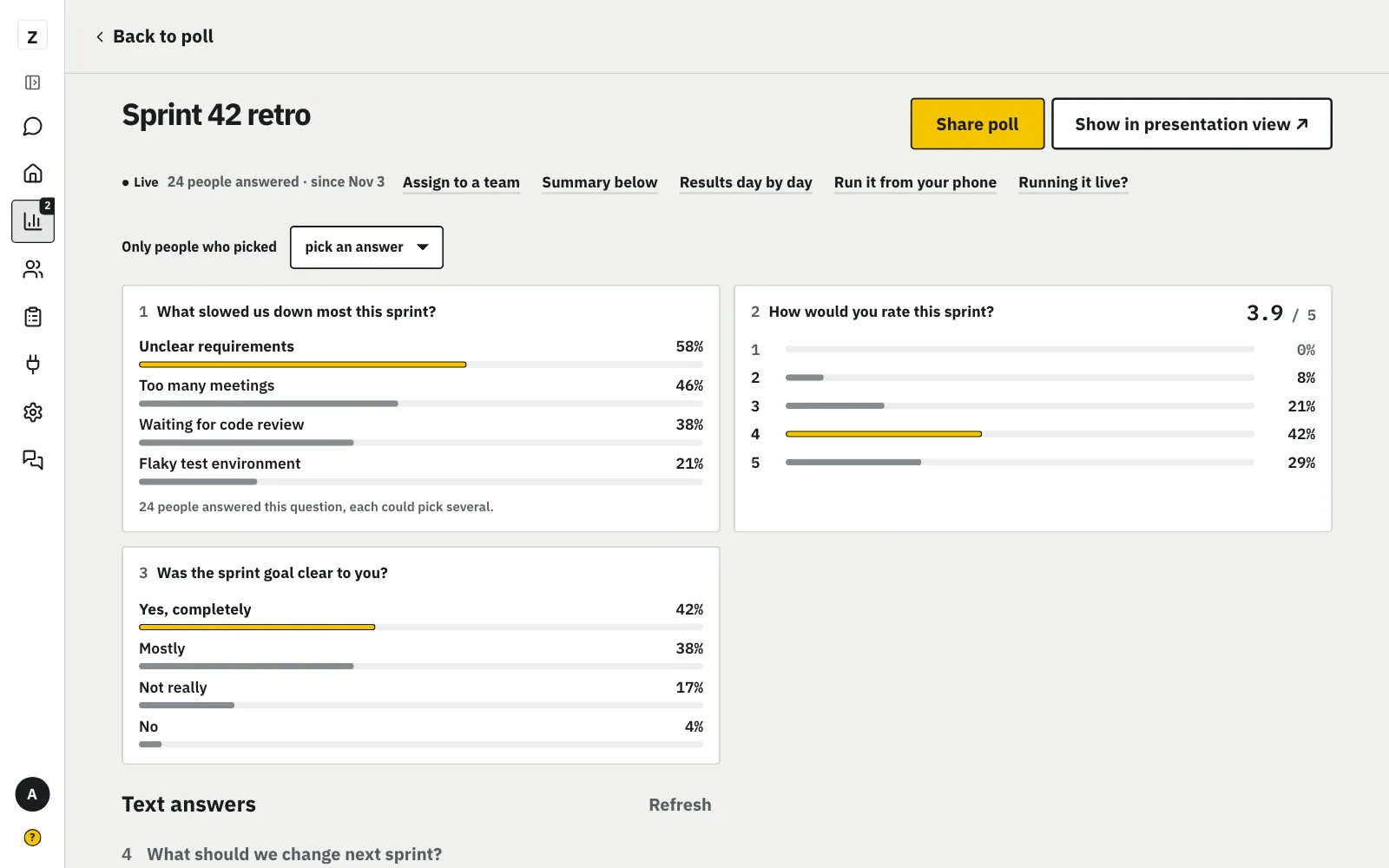
Every question's results show at once, one under another. New answers come in by themselves.
MoreLess: All results at once
An average below 3 is in red. It's a good place to start. Text answers are under the results.
Open “How many stopped” to see at which question people most often give up.
MoreLess: See where people drop off
“How many stopped” shows how many came in, started and finished, how many answered each question and where most people stop. Under “Finished” you see how many are “still going”: they started in the past 14 days and may come back, since the poll waits for them at the question where they stopped. Numbers only, no answers and no people. When fewer people answered than you set, only “Came in” and “Started”. When many people drop off at one question (at least 3 and 15% of those who started), the funnel has “Shorten from question N”: a copy of the poll opens in the editor, the AI shortens questions N to the end and the earlier ones stay. This poll and its answers don't change.
Guests mark a place on the map, and in the results you see dots with the number of people.
MoreLess: The "Map" question
Pick the "Map" type and set where the map opens. We save the point to about 1 km, and the browser doesn't ask guests for their location. In the results the dots stand in the middle of squares, only where at least as many people are as your anonymity threshold. Only you see the map. A map answer doesn't steer later questions.
The "Map" question
Guests mark a place on the map, and in the results you see dots with the number of people.
Guests ask you questions and upvote others' questions; the room sees the list, most upvoted first.
MoreLess: Questions from guests
Add a “Questions from guests” question, e.g. “What do you want to ask the board?”. A guest types up to 3 questions and upvotes ▲ others'; the same question asked again counts as a vote. Everyone the poll is for sees the questions, without names, from the first one; nobody, you included, sees who asked or who upvoted. That's why a poll with Q&A can't have “Only me” results. Presentation view shows the 6 most upvoted. In the Pilot and under the results you mark a question “Answered” or hide it. In the summary CSV each question gets its row with its votes; “Responses per person” leaves Q&A out.
Questions from guests
Guests ask you questions and upvote others' questions; the room sees the list, most upvoted first.
Download the results to a spreadsheet: the summary or each person's answers.
MoreLess: Export
“Export” under the results gives three files and a printable report. “Summary (CSV)”: each question's numbers and percentages, plus the text answers. “Responses per person” (CSV or XLSX): a row per person and a column per question, for your own analysis in Excel or Sheets. Nothing about the person: no times, tags or answer order, and hidden text answers stay empty. The files come from the number of people you set, like the results. With the answer filter on, the files hold only those people; responses per person aren't split by place. “Printable report (PDF)” opens a light A4 page in a new tab for your boss or the venue's owner: the AI report if you've already made one, the charts with NPS, and up to 5 newest text answers per question. Click “Print or save as PDF” and pick “Save as PDF” in the print window. The report doesn't run a new AI analysis. A dynamic poll has no printable report yet.
Archive the poll when you want no more answers. The results stay, and “Restore” brings it back.
MoreLess: Archive the poll
Click “Archive”, then click again to confirm. An archived poll takes no answers and doesn't count towards the limit. You'll find it in the list under “Archive”.
The counter next to “+ New poll” shows your active polls.
MoreLess: Active poll limit
Live polls count towards the limit, drafts don't, on the computer and on the phone (on the phone above the list). At the limit, archive an old poll or click “Ask for more”.
Active poll limit
The counter next to “+ New poll” shows your active polls.
In the open poll, click “Assign to a team” under its title to tag it with a team name.
MoreLess: Team label
A label such as Kitchen helps you find one team's polls: a filter appears above the list. The same on the phone and the computer.
Team label
In the open poll, click “Assign to a team” under its title to tag it with a team name.
The bin on the list, or “Delete poll” on its page and in “Settings”, removes the poll and its answers.
MoreLess: Delete a poll
This can't be undone. If you only want to stop the answers, choose “Archive”.
Delete a poll
The bin on the list, or “Delete poll” on its page and in “Settings”, removes the poll and its answers.
“Move to …” in the poll's “Settings” moves it between My polls and the company.
MoreLess: Move a poll
A draft or a poll without answers moves whole. My polls have no venue, team audience or company look, so those settings go. A poll with answers stays where it is and has no move option; copy its questions with “Duplicate poll”. A series round stays in its series.
Move a poll
“Move to …” in the poll's “Settings” moves it between My polls and the company.
The copy icon at the start of a poll's row in the list (tooltip “Copy”) makes a new draft with the same questions and settings.
MoreLess: Duplicate a poll
It works for a draft too, and the original stays as it is. The same button is in the editor's “Settings” step and in the poll's “Settings”. The copy has “(copy)” in its name, has no answers and opens in the editor. Consent to keep answers longer than 180 days is given again in the copy. A series round is copied with “+ New round”.
Duplicate a poll
The copy icon at the start of a poll's row in the list (tooltip “Copy”) makes a new draft with the same questions and settings.
On a running poll's page, tap “Edit” next to a question in the list: fix its words and options, even with answers in.
MoreLess: Fix a question while the poll runs
When someone has answered, “Save” asks once: “Keep answers” (a typo, say) or “Reset answers to this question” (only this question's answers go). An answer stays with its option when you change the option's text; a removed option takes its answers with it. Guests in the middle of the poll see the change from their next question. Another kind of question or new questions: “Duplicate a poll”.
Fix a question while the poll runs
On a running poll's page, tap “Edit” next to a question in the list: fix its words and options, even with answers in.