For companies
Slack: connect your team's channel
Poll results, low ratings and questions from the room in one Slack channel. tuned. only sends and reads nothing.
Steps
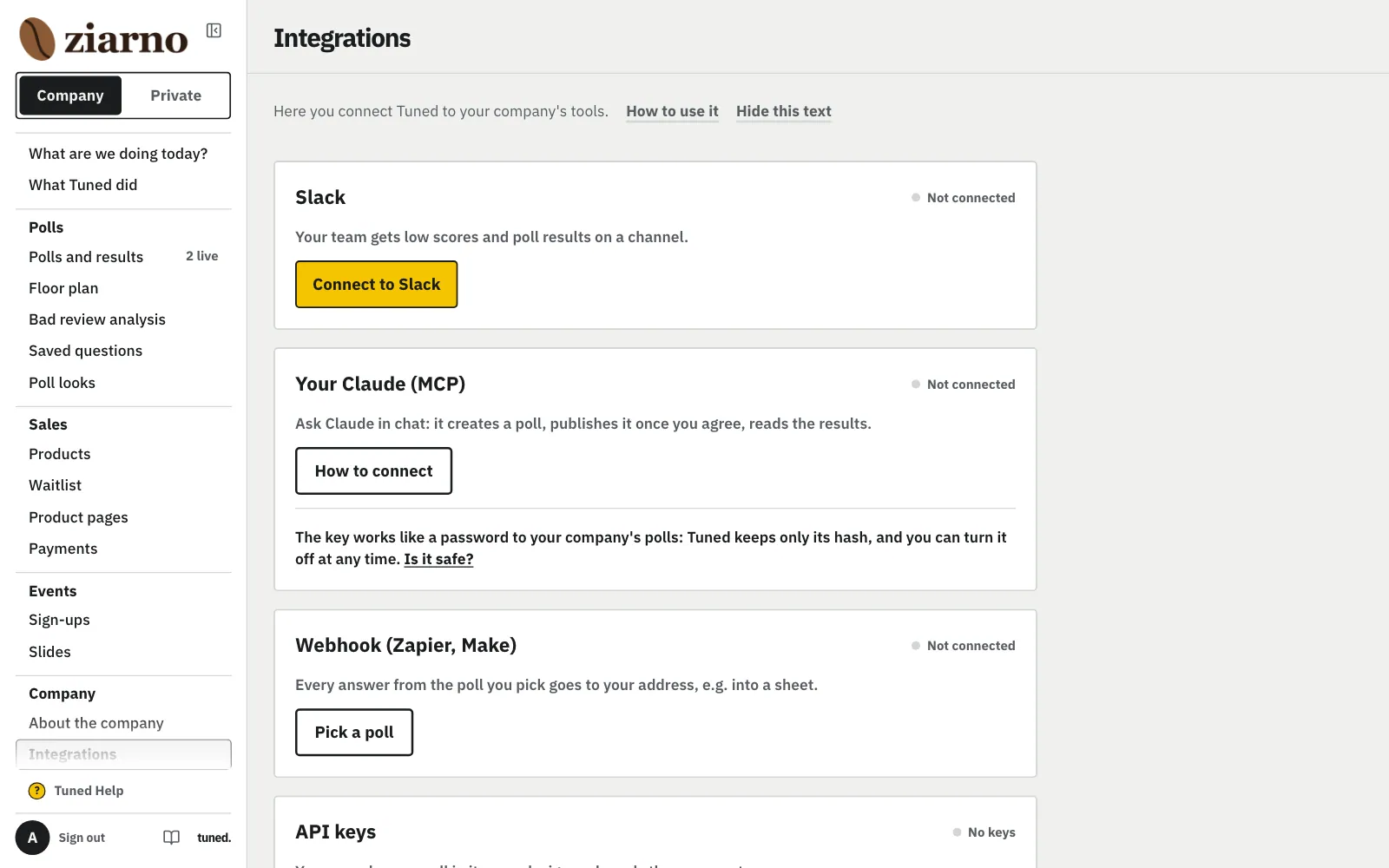
In the menu, open Integrations and on the Slack card click “Connect to Slack”.
MoreLess: Click “Connect to Slack”
The company account's owner changes these connections; someone with the “Runs polls” role doesn't see them. You set nothing up in Slack and copy nothing: the button opens Slack's page with our tuned. app.
On Slack's page, pick a channel from the list and click “Allow”.
MoreLess: Pick a channel and click “Allow”
Sign in to Slack if asked and check that it's your company's workspace. tuned. asks for one thing only: posting to the channel you pick. You have 10 minutes; after that, click “Connect to Slack” again.
Pick a channel and click “Allow”
On Slack's page, pick a channel from the list and click “Allow”.
Back here, the Slack card says “Connected: #channel” and the workspace's name.
MoreLess: Check the channel's name
“Slack connected.” shows above the card. The connection's address is encrypted and never shown in the panel.
Click “Send a test message” to check that the channel works.
MoreLess: Click “Send a test message”
When Slack takes the message, “Sent. Check the channel.” shows above the card. You can send at most 5 tests an hour.
The channel has a message from tuned.: “Test: tuned. can post to this channel.”
MoreLess: See the message in the channel
Under it are your company's name and tunedbrand.com. No message: check that you're looking at the channel named in the Slack card, then see the step “When something doesn't work”.
See the message in the channel
The channel has a message from tuned.: “Test: tuned. can post to this channel.”
In “What goes to Slack”, switch on or off: low rating, goal reached, new question from the room.
MoreLess: Pick what goes to Slack
At the start “Someone gave a low rating” and “A poll reached its goal” are on, and “A new question from the room” is off. This is the default for every company poll. Typed answers never go to Slack, only how many there are.
In the “Who answers” step, set a goal and leave “Send the results to Slack” on.
MoreLess: Turn Slack on in the poll
The switch is on when “A poll reached its goal” is on in Integrations. You can turn it off for this poll. Without a goal no summary comes, because it's sent when the goal is reached.
Three kinds of messages arrive in the channel, each with a button to the panel.
MoreLess: What arrives in the channel
No one gets tagged: not people, not the whole channel.
- A poll reached its goal
- The title, the number of answers, the results of up to 3 questions (bars, average or NPS), how many text answers there are and a “See full results” button.
- Someone gave a low rating
- A rating of 1 or 2 out of 5 or 0 to 3 in NPS: the poll, the question, the rating, the place and the time. Only from polls with “Tell me about a low score” on; with “After several scores”, at most one message every 24 hours with the number of people and the places.
- A new question from the room
- The poll's title, without the question's text, at most once every 10 minutes per poll. The text and moderation are in the panel (“See the questions”).
What arrives in the channel
Three kinds of messages arrive in the channel, each with a button to the panel.
Back from Slack, the message above the card says what happened.
MoreLess: When something doesn't work
When the test fails and the channel is in the card, connect the channel again with “Change channel”.
- “Connection cancelled”
- “Cancel” was clicked on Slack's page. Click “Connect to Slack” again.
- “Too much time passed on Slack's page”
- More than 10 minutes passed, or you came back in another browser. Connect again and stay in the same browser.
- “Couldn't connect to Slack”
- Slack refused. Slack's error code is next to it: try again, and if the same code comes back, write to us and include it.
- An error on Slack's page, no way back
- Slack didn't let the app into your workspace. Write to us with the error's text.
- “Couldn't send.” on the test
- 5 tests were already sent this hour, someone removed the tuned. app or the channel in Slack, or Slack is briefly down. Wait a moment or click “Change channel”.
“Change channel” goes through Slack's page again, “Disconnect” stops the messages.
MoreLess: Change the channel or disconnect
After “Disconnect” we delete the connection's address and nothing goes to the channel any more. To pick a channel again, use “Connect to Slack”.